

· 5 min read
Poor man’s RAG: AWS S3 Vector Store
Using AWS S3 Vectors, we built a simple and cost-effective RAG solution that augments an LLM with domain-specific knowledge.
How did it start?
This project started when we needed a simple RAG (Retrieval-Augmented Generation) pipeline on AWS. We had already worked with RAG before, and our first thought was to use OpenSearch. Since it’s AWS’s own managed vector search service, it seemed like the obvious choice, but we were curious whether there was a simpler or cheaper alternative.
While researching alternatives, we came across AWS S3 Vectors, a new feature that brings native vector storage directly to S3. No separate servers, no cluster management, you just upload the vectors and start querying them. That was exactly what we needed.
AWS S3 Vector Store
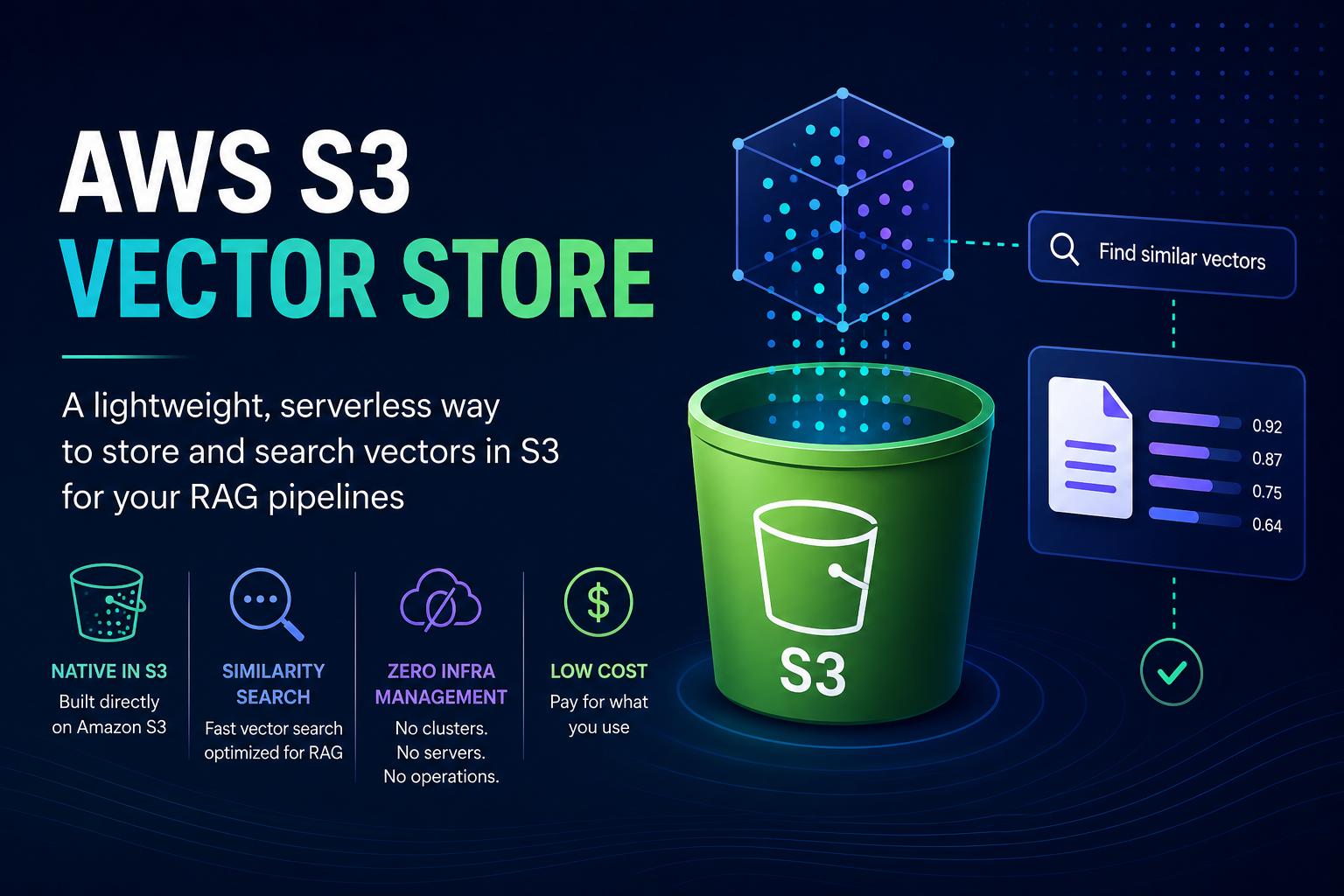
AWS S3 Vectors is a native vector storage solution within S3, specifically designed for storing and querying embeddings.
What can the S3 vector store do?
- Storage and indexing of embedding vectors in S3
- Similarity-based search (optimized for RAG use cases)
- Zero infrastructure management
- Low costs
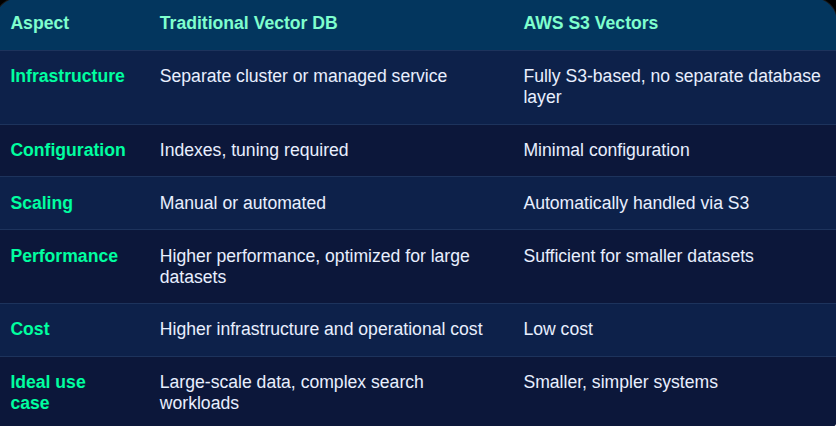
In contrast, traditional vector databases are much more powerful and flexible for complex search scenarios and large-scale datasets. Here is a quick comparison:
How we built the project?
We wanted to keep this setup as minimal as possible. Our goal was to give our LLM access to a relatively small dataset so it could answer some specific veterinary questions.
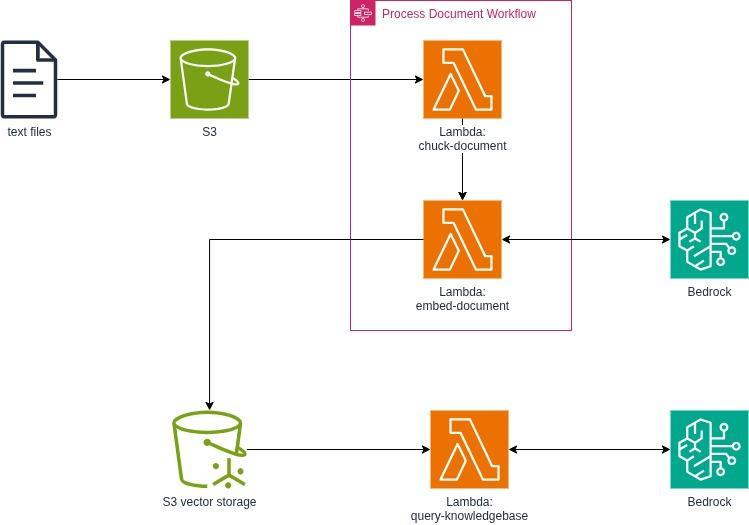
For the infrastructure, we created a Vector Storage Bucket and a simple Object Storage Bucket for the raw files. We kept the processing pipeline lightweight, using small Python Lambdas inside a Step Functions flow. At the end, we also added a separate Lambda responsible for prompting and generating the final response.
The whole infrastructure looked like this at the end:
Data processing
As a first step, we collected a few papers on very specific veterinary topics. These were uploaded to S3. We then started a Step Function, which took the uploaded file name as input and executed two steps:
- Chunk Document: it reads the article from
raw_data/{path}/article.txt, splits it into 1000-character chunks with a 200-character overlap, and writes the result toprocessed/{path}/article_chunks.json. The chunk size and overlap are configurable, since tuning them has a direct impact on retrieval accuracy. Smaller chunks can improve precision but may lose context more easily, while larger chunks preserve more context but can lead to noisier results. The overlap helps ensure that important information is not lost at chunk boundaries, although increasing it raises storage and processing costs (even if this is not particularly significant in our small-scale project). - Embed Document: it reads the chunks, generates embeddings, and stores the vectors in the S3 Vectors index along with the original text as metadata. For embedding generation, we used the Amazon Titan Text Embeddings V2 model, which is an AWS-developed foundation model optimized for embedding use cases and is relatively cost-efficient.
Testing the RAG
We built the test Lambda in a way that it expected a manual input with the following fields:
{
 "question": "What are the symptoms of kennel cough?",
 "use_rag": false
}
The Bedrock model used by the Lambda was also defined through an external variable so that it could easily be changed later. The prompt itself was intentionally simple. It consisted only of the user’s question and, when use_rag=true, the context retrieved from the vector store.
def retrieve_context(s3vectors, bedrock, question: str, top_k: int) -> tuple[str | None, list[str]]:
   embedding = get_embedding(bedrock, question)
   results = query_vectors(s3vectors, embedding, top_k)

   chunks = []
   sources = []
   for r in results:
       meta = r.get("metadata", {})
       text = meta.get("text", "")
       if text:
           chunks.append(text)
           sources.append(r["key"])

   context = "\n\n---\n\n".join(chunks) if chunks else None
   return context, sources


def build_prompt(question: str, context: str | None) -> str:
   if context:
       return f"""Use the following context to answer the question. If the context doesn't contain relevant information, say so.

Context:
{context}

Question: {question}"""
   return question
Even the prompt alone could have been optimized much further. For example, we could have enforced more strictly that the model answer only be based on the retrieved context, defined an explicit response format, or required source citations at the end of every answer.
However, even with this extremely minimal, almost one-line prompt, we ran into a surprisingly interesting issue. The Nova Lite model we used for testing was already surprisingly good at answering veterinary-related questions even without any retrieved context. To be fair, we should also mention that we do not have deep expertise in veterinary medicine, so we almost certainly missed some inaccuracies in its responses. Still, the model clearly had no trouble handling Latin medical terminology or drug names, even when we intentionally stress-tested it with a mix of Hungarian and English questions.
Because of this, we eventually had to find a more specific way to test the vector store and the retrieval pipeline itself. We ended up looking for a highly specialized veterinary research paper that allowed us to ask questions where the added value of RAG would become clearly visible. During one test, for example, the LLM successfully identified a disease based on more than a dozen symptoms that didn’t even appear before among its guesses without RAG. It also handled dense professional abbreviations surprisingly well once they appeared in the retrieved context.
How expensive is this cheap setup actually?
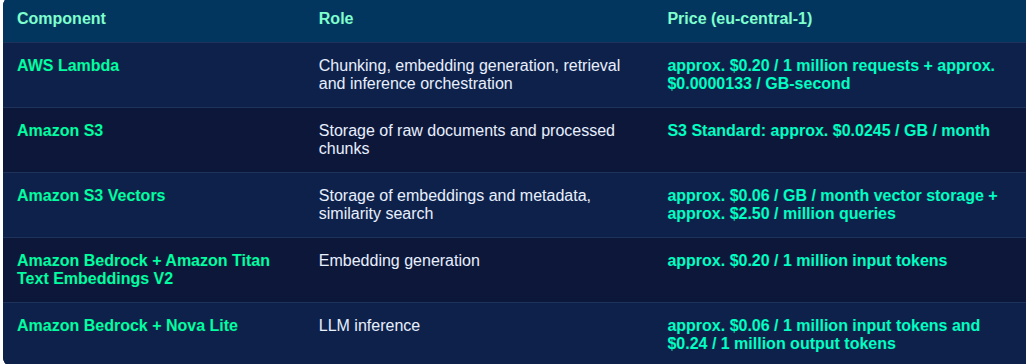
The overall infrastructure cost is very low, and since every component uses a serverless pricing model, there is no fixed infrastructure cost. Throughout the entire testing process, the total cost did not even reach the one-dollar mark.
Conclusion
There is still plenty that could be improved in this project. The current chunking strategy is fairly naive, as we worked with a fixed chunk size and overlap, and we have not yet experimented much with different embedding or query models. The prompting strategy also remains a topic for further improvement.
That said, it became clear that S3 Vectors works surprisingly well as an RAG backend. For smaller projects and POCs, where there isn’t a massive amount of data, it can be a particularly good fit, especially since it is significantly more cost-effective than most alternatives.
If you’re curious about how we at Code Factory can help you with this, take a look at our services pages.